
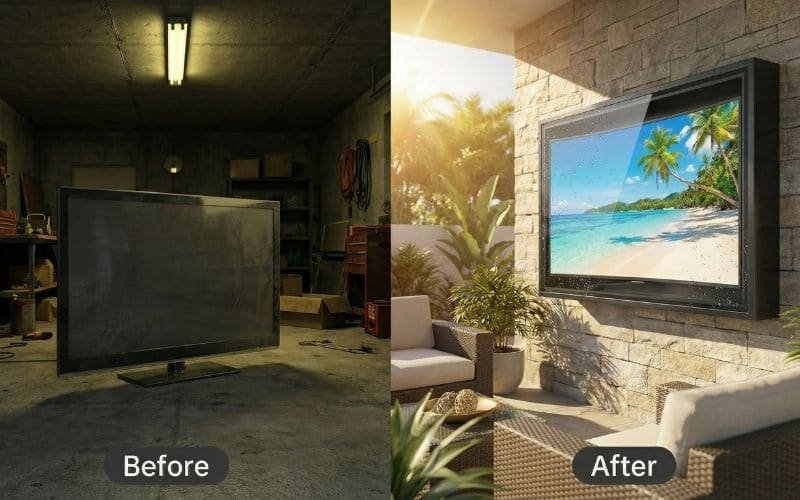
We all have one. It might be in the basement, tucked behind the holiday decorations. It might be in the garage, collecting a fine layer of sawdust. It is the Electronic Graveyard. It is that place where perfectly good technology goes to die simply because you upgraded to something thinner, smarter, or bigger.
Maybe it is a heavy Panasonic Plasma from 2010 that heats the room like a radiator. Maybe it is that “cutting edge” Samsung Curved TV you bought in 2015 because it looked cool, but now it doesn’t fit your new living room aesthetic. Or maybe it is just a standard 40-inch LED that you replaced with a massive 75-inch screen for the Super Bowl.
You look at these screens and feel a pang of guilt. They still work. The picture is still great. But they are homeless.
Meanwhile, you are staring at your patio, wishing you could watch the game while grilling, but you are paralyzed by the price of “Outdoor TVs.” You Google “SunBrite” or “Samsung The Terrace” and see a price tag of $3,000 or more. You laugh, close the browser, and go back to listening to the game on the radio like it’s 1950.
Here is the good news: You are sitting on a goldmine.
You do not need to buy a new TV for your backyard. In fact, that “dinosaur” in your garage might actually be better suited for outdoor use than a brand new, ultra-thin OLED.
Yes! You can absolutely use your old, curved, or regular indoor flat screen outside. The secret is not the TV itself, but the environment you put it in. By placing it inside an Outvion Weatherproof Enclosure, you create a sealed, climate-controlled ecosystem. The enclosure’s deep profile accommodates curved screens effortlessly, and its active cooling fans manage the heat of older Plasmas. It is the ultimate eco-friendly upcycling hack that saves you thousands.
Last Updated: Feb 3th. 2026 | Estimated Reading Time: 12 Minutes
Can You Put a Regular Flat Screen Outside?
Verdict Box: The Myth vs. The Reality
- The Myth: “Indoor TVs are delicate flowers. If I take one outside, the humidity will short-circuit the motherboard instantly.”
- The Truth: Indoor TVs are surprisingly resilient industrial products. Their materials (glass, silicon, plastic) are waterproof; only their exposed circuits are vulnerable. By placing them in an Outvion Enclosure, you aren’t changing the TV; you are moving the “living room environment” outdoors.
Let’s dismantle the biggest lie in the AV industry: the idea that indoor TVs are made of sugar and will dissolve if they smell fresh air. To understand why you can use a regular flat screen outside, we need to look at what actually kills electronics.
1. The Humidity Resilience Factor
Most people believe that “humidity” kills TVs. This is technically incorrect. Condensation kills TVs.
- Operating Specs: If you look at the manual for your Sony or LG indoor TV, you will see an operating humidity range of “10% to 80% non-condensing.” This means the TV is designed to work in Miami or Singapore, where humidity is naturally high.
- The Threat: The danger arises when the air temperature drops below the Dew Point, causing that humidity to turn into liquid water droplets on the circuit board.
- The Enclosure Defense: The Outvion enclosure doesn’t just block rain; it stabilizes the temperature. By retaining the TV’s own standby heat (approx. 5-10 Watts) and using active airflow to prevent stagnant air pockets, the enclosure prevents the internal environment from hitting that critical “Dew Point.” It keeps the humidity in the vapor phase, where it is harmless to your electronics.
2. Panel Durability: Glass vs. Element
The screen itself (the panel) is a sealed unit. It consists of layers of glass, optical polarizers, and liquid crystal fluid.
- Weather Proof: Glass does not rust. Plastic does not rot. The physical screen of an indoor TV is inherently weatherproof.
- The Hazmat Suit: The only vulnerable parts of a TV are the copper ports (HDMI/USB) and the vents. When you place a standard TV inside an Outvion Enclosure, you are effectively giving it a Level-A Hazmat Suit. The enclosure takes the hit from the rain, the pollen, the dust, and the spiders. The TV inside remains pristine, operating in a filtered air bubble.
3. Screen Finishes: Glossy vs. Matte
Here is an area where using an indoor TV is actually a visual advantage.
- Outdoor TVs: To fight the sun, dedicated outdoor TVs use heavy, aggressive matte coatings. While this stops glare, it also dulls the colors and reduces contrast. The picture can look “milky.”
- Indoor TVs: Modern 4K Indoor TVs (especially QLEDs or OLEDs) use Glossy or Semi-Gloss screens. These are designed to make colors “pop” and blacks look deep.
- The Combo: When you put a glossy indoor TV inside an Outvion enclosure, you get the best of both worlds. The enclosure’s front shield handles the physical protection, while the TV inside retains its high-contrast, vibrant cinema look.
4. The “Nits” Factor (The Honest Trade-off)
I want to be transparent with you as a fellow DIYer. The one area where a standard indoor TV lags behind a $3,000 outdoor TV is Brightness, measured in “Nits.”
- Indoor TV: Typically 250 to 350 Nits.
- Outdoor TV: Typically 700 to 2,000 Nits.
- Does this mean your old TV won’t work? No. It just means you have to be smart about Placement.
- The Fix: If you mount a standard indoor TV facing direct sunlight at noon, you won’t see anything. It will be washed out. However, if you mount the Outvion enclosure facing North or East, or place it under an awning, pergola, or deck overhang, 350 Nits is perfectly watchable for sports and movies. You are trading “install anywhere” convenience for $2,000 in savings.
5. The Warranty Reality Check
Let’s address the elephant in the room.
- The Risk: “If I put my Samsung indoor TV outside, doesn’t it void the warranty?”
- The Answer: Yes. Absolutely. If you call Samsung and say “My TV is on the patio,” they will hang up.
- The Logic:Who cares? We are talking about a “Disposable Asset Strategy.”
- Scenario A: You buy a $3,000 Outdoor TV. You pay $400 for an extended warranty. It breaks in Year 4. You fight with customer service.
- Scenario B: You take a $300 indoor TV (or a free one from your garage). You put it in a $600 enclosure. If the TV dies in 3 years… you throw it in the recycling bin and buy another $300 TV.
- The Conclusion: You can replace your indoor TV ten times for the price of one outdoor TV. You are self-insuring through cost savings.
The “Curve” Ball: Will My Curved TV Fit?
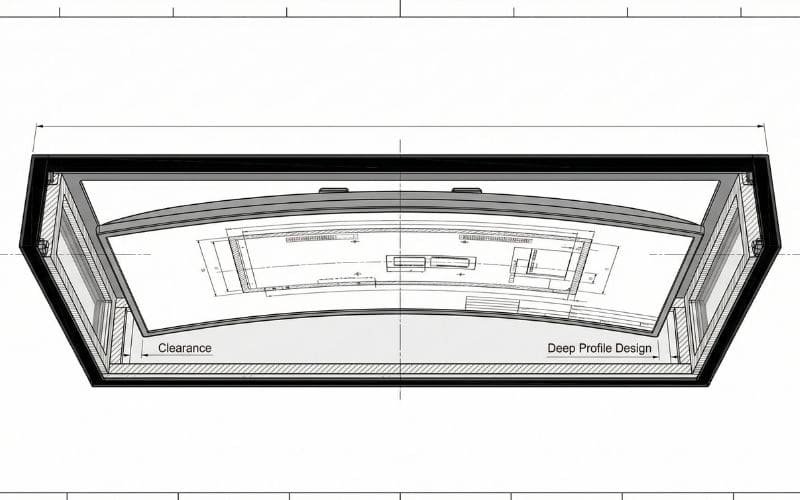
The Geometry of the Box The Myth: “Curved TVs need special curved mounts or won’t fit in flat boxes.” The Reality: An enclosure is a 3D box, not a flat skin. It has depth (Z-Axis). As long as the curve doesn’t exceed the depth of the box, it fits perfectly. In fact, curved TVs are excellent for outdoor use because the curve naturally reduces side glare.
Around 2014-2016, Samsung and LG pushed “Curved TVs” hard. Then, just as quickly, they stopped. Now, millions of these high-quality 4K screens are sitting in basements because they look “weird” on a flat living room wall.
They are perfect candidates for your outdoor theater.
The Depth Myth People often confuse “Screen Protectors” (which are flat sheets of plastic adhered to the glass) with “Enclosures” (which are full boxes).
- Screen Protector: Cannot fit a curve.
- Outvion Enclosure: This is a cabinet. It has a depth of roughly 7.9 inches (20cm) depending on the model.
- The Math: Most curved TVs, even the aggressive ones, have a total depth (from the center back to the outer edge of the curve) of about 3 to 5 inches.
- The Result: There is plenty of clearance inside the enclosure for the curve. The TV mounts to the flat backplane using standard VESA screws, and the curved edges just “float” harmlessly behind the front shield.
The Visual Benefit of Curves Outdoors Outdoors, light comes from everywhere—the sky, the pool, the neighbor’s white fence. A flat screen reflects everything in a wide 180-degree arc. A curved screen essentially “cups” the reflection angles. It blocks reflections coming from the extreme sides. This means that a curved TV inside an enclosure often has better contrast and less glare than a flat TV in the same spot.
If you have a Curved TV gathering dust, you have the ultimate patio upgrade waiting to happen. Do not throw it away.
Old Plasma & LCDs: The “Winter Warriors”
The Secret of Inefficiency The Myth: “Old TVs run too hot to be in a box.” The Truth: In outdoor applications, heat is your friend (especially in the UK, Canada, or Northern US). The massive waste heat generated by old CCFL and Plasma tech acts as a built-in heater, preventing the TV from freezing in winter.
Let’s talk about those heavy, thick beasts from 2010. The ones that weigh 80 pounds and double as a space heater. In the world of modern eco-efficiency, they are dinosaurs. But in the world of outdoor durability, they are Winter Warriors.
The “Heat” Advantage Modern LED/OLED TVs are very efficient. They run cool. In the middle of a Canadian winter (-20°C), a modern TV might get too cold, causing the Liquid Crystals to become sluggish (ghosting) or even freeze. Old TVs use CCFL (Cold Cathode Fluorescent Lamps) or Plasma Gas cells. These technologies are inefficient, meaning they turn a lot of electricity into heat.
- The Thermodynamics: When you put a Plasma TV inside an Outvion Enclosure, that waste heat is trapped by the polycarbonate shell. It creates a cozy “Micro-Climate.” While it might be freezing outside, inside the box it is a toasty 60°F. This keeps the electronics happy and responsive without needing an external heater.
Handling the Summer Heat “But what about summer?” you ask. “Will it melt?” Outvion enclosures are equipped with Active Thermostatic Fans. When the temperature inside the box rises (due to the sun or the TV’s heat), the fans kick in. They flush out the hot air and pull in fresh air. Because older TVs are built with heavy metal chassis and massive internal heatsinks (unlike flimsy modern plastic TVs), they are actually more robust against heat than new models. They were built to run hot.
The Weight Warning There is one catch: Weight. A modern 55″ TV weighs 30 lbs. An old 55″ Plasma can weigh 80-100 lbs. When you combine an 80lb TV with a 40lb Enclosure, you are hanging 120 lbs on your wall.
- The Fix: You must respect the gravity. Do not use drywall anchors. Do not use toggle bolts. You must use Lag Bolts driven directly into the center of wood studs or masonry anchors into brick/concrete. If you mount it correctly, the weight is irrelevant.
The “V-D-W” Measurement Rule: How to Measure
Don’t Trust the Inch The Trap: A “55-inch TV” refers to the diagonal screen size, not the physical width of the plastic frame (bezel). An old 55-inch TV with giant speakers on the side might be 6 inches wider than a new 55-inch TV. The Rule: Measure the V (VESA), D (Depth), and W (Width) before you buy.
Before you order an enclosure, you need to grab a tape measure. Do not guess. Here is the “V-D-W” method to guarantee a perfect fit.
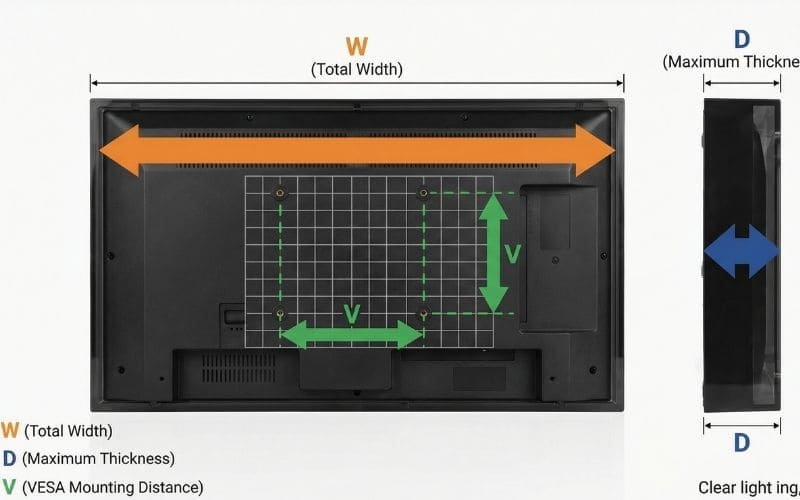
Step 1: W is for Width (Bezel to Bezel) Measure the physical width of your TV from the left edge of the plastic frame to the right edge.
- Why? Older TVs have wide bezels (“chins” and “foreheads”). Some Sony models have “ears” (side speakers). You need to ensure the physical width is less than the internal width of the enclosure.
Step 2: D is for Depth (The Bump) Turn the TV sideways. Measure the thickest part.
- The Bump: Most TVs are thin at the top and fat at the bottom (where the power supply and speakers live). Measure the fat part.
- Clearance: Outvion enclosures are deep, but you need to account for the mounting bracket too. Usually, if your TV is under 4 inches thick (most are), you are golden.
Step 3: V is for VESA (The Holy Grail) Look at the back of your TV. You will see four screw holes in a square or rectangular pattern. This is the VESA mount.
- Measure: Measure the distance between the holes horizontally and vertically in millimeters.
- Common Sizes: 200×200, 400×400, 600×400.
- Universal Fit: The Outvion internal mount is a “Universal Rail” system. It slides to accommodate almost any pattern. Whether your old TV is 200mm wide or 600mm wide, the rails will catch it.
Outvion Size Chart – Max Dimensions per Model
| Enclosure Model | Max TV Width | Max TV Height | Max TV Depth | Fits Screen Sizes (Approx) |
|---|---|---|---|---|
| Outvion 43″ | 39.5″ (100cm) | 23.5″ (60cm) | 3.5″ (9cm) | 32″ to 43″ |
| Outvion 55″ | 50.0″ (127cm) | 30.0″ (76cm) | 3.5″ (9cm) | 49″ to 55″ |
| Outvion 65″ | 59.0″ (150cm) | 35.0″ (89cm) | 3.5″ (9cm) | 60″ to 65″ |
| Outvion 75″ | 68.0″ (173cm) | 40.0″ (101cm) | 3.5″ (9cm) | 70″ to 75″ |
(Note: Always check the specific product page for the most current internal dimensions, as specs can evolve.)
Making “Dumb” TVs Smart: The Streaming Revolution
The Brain Transplant The Problem: Your old 2012 TV is “Dumb.” It doesn’t have Netflix, or the apps are so old they crash. The Solution: The Outvion enclosure has extra internal space designed specifically to hide a Roku, FireStick, or Apple TV. You are giving your dinosaur a brain transplant.
This is the key to the whole operation. You aren’t just mounting an old TV; you are modernizing it.
The “Stick” Hack Because the enclosure is a box (not a skin), there is “dead space” inside—usually behind the TV or at the bottom.
- Plug In: Plug a 4K Streaming Stick (Roku/FireTV) into the HDMI port of your old TV.
- Power: The enclosure usually requires a power strip or has room for a splitter. Plug the stick’s USB power cord in.
- Hide: Velcro the stick to the back of the TV or the inside wall of the enclosure.
Now, your 10-year-old TV runs the latest operating system. It is just as fast and smart as a 2024 model.
The Wi-Fi Signal (RF Transparency) “But will the box block my Wi-Fi?” This is where material science saves the day.
- Metal Boxes: If you bought a metal industrial cabinet, it would act as a Faraday Cage, blocking Wi-Fi signals.
- Outvion: The shell is made of High-Density Polycarbonate and ABS. These plastics are RF Transparent. Wi-Fi signals pass right through them, just like they pass through drywall. Your streaming stick will connect to your home Wi-Fi without issue.
Mounting Mechanics: Articulating vs. Flat
Verdict Box: The Motion Factor The Choice: How do you want to watch? Static (Flat): Safer, lower profile, less stress on the wall. Best for windy areas. Articulating (Arm): Maximum flexibility. Pull it out to face the pool; push it back to face the BBQ. Requires stronger wall anchoring.
How you mount the enclosure is just as important as what you put in it.
The Standard Mount (Included) Outvion enclosures come with a standard mounting system that bolts flat to the wall.
- Pros: It is rock solid. It has the lowest profile (doesn’t stick out far). It is the safest option for heavy old TVs.
- Cons: You can’t turn it.
The Articulating Arm (The Upgrade) If you have a large patio with multiple zones (e.g., a pool area and a dining table), you might want to swivel the TV.
- The Physics: You can bolt the back of the Outvion enclosure to a third-party articulating arm (VESA to VESA).
- The Warning: Leverage is powerful. An 80lb Plasma TV inside a 40lb enclosure on a 2-foot arm creates massive torque on the wall studs. If you go this route, you must use heavy-duty lag bolts into the center of multiple studs. Do not skimp on the hardware.
Mount Types Pros & Cons
| Mount Type | Best For | Pros | Cons |
|---|---|---|---|
| Flat / Tilt (Standard) | Windy areas, Heavy TVs | Strongest, Slimmest, Included in price. | Fixed viewing angle. |
| Articulating (Swivel) | Multi-zone patios | Flexible viewing, cool factor. | Creates leverage stress, expensive upgrade. |
| Ceiling Mount | Pergolas, Gazebos | Saves wall space, 360-degree potential. | Requires solid overhead beam structure. |
Summary & Compatibility Matrix
So, you have dug three TVs out of your basement. A heavy Plasma, a sleek new OLED, and a chunky old LCD. Which one should you sacrifice to the patio gods?
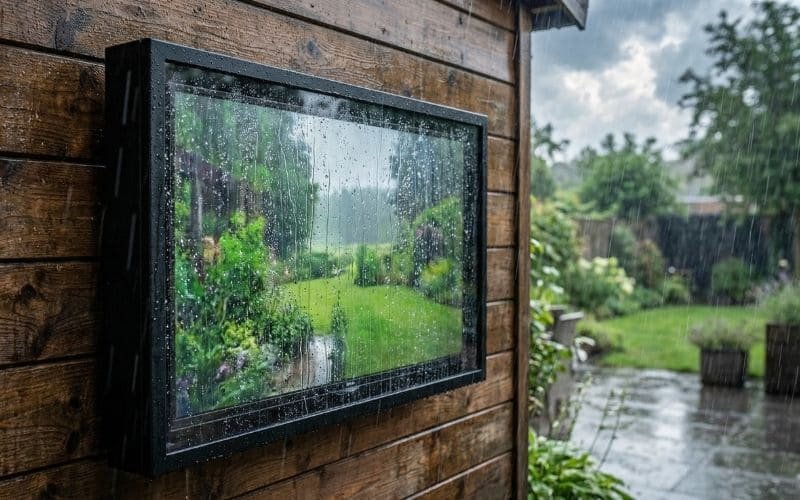
Not all screens are created equal when it comes to battling the sun and the cold.
- The “Sun Fighter”: If you are fighting daylight, you need Nits (Brightness). Old LCDs with CCFL backlights are surprisingly potent here.
- The “Cold Warrior”: If you live in Canada, you want Heat. Plasma is your best friend.
- The “Night Owl”: If you only watch movies at night, OLED provides the best picture, but be careful—organic pixels (the ‘O’ in OLED) can degrade faster under direct UV exposure than inorganic LEDs.
Use the matrix below to choose your champion:
Which TV is Best for Outdoors? (The Ultimate Battle Matrix)
| TV Type | Outdoor Suitability | Pros for Enclosure Use | Cons |
| Modern LED (4K) | ⭐⭐⭐⭐ (Great) | Lightweight, fits easily, cheap to replace ($300). | Can be dim (low nits) if mounting in direct sun. |
| Curved TV | ⭐⭐⭐⭐⭐ (Excellent) | Curve reduces side glare naturally. Fits deep Outvion box perfectly. | Hard to resell; looks weird on indoor walls. Best use! |
| Old LCD (CCFL) | ⭐⭐⭐⭐⭐ (Excellent) | High Brightness, Durable build. Generates heat for winter. | Heavy. Thick bezels need “V-D-W” measuring. |
| Plasma | ⭐⭐⭐ (Good for Winter) | Amazing contrast. Massive heat generation prevents freezing. | Very Heavy (80lbs+). Power hungry. Needs active fans (Mandatory). |
| OLED | ⭐⭐ (Night Only) | Perfect blacks. Thin profile. | Not bright enough for day use. UV risk to organic pixels. |
Conclusion
Your garage holds treasure.
Stop looking at that old TV as electronic waste. Stop looking at your curved TV as a mistake. These screens still have life in them. They are just waiting for the right environment.
By combining your “free” existing hardware with a professional-grade Outvion Enclosure, you solve the outdoor entertainment puzzle for a fraction of the cost. You keep e-waste out of the landfill, you clear up space in your house, and you get the backyard oasis you’ve been dreaming of.
Grab a tape measure. Go to the garage. Measure the V-D-W. Your new outdoor cinema is already in your house; you just need to unbox it.
FAQ:
1. My TV has a “bump” at the bottom for speakers. Will it fit?
Yes. This is very common in older TVs. The Outvion enclosure is designed with extra depth (usually 3.5 to 4 inches clearance) specifically to accommodate these “chins” and bumps. As long as the total depth of the thickest part is within the enclosure’s limit, the thinner top part will just have more air space, which helps with cooling.
2. Is the enclosure compatible with a swivel mount?
Yes. The back of the Outvion enclosure features a standard VESA pattern (steel reinforced). You can bolt this pattern to any standard, heavy-duty outdoor articulating arm (purchased separately). Just ensure the arm is rated for the combined weight of the TV plus the Enclosure.
3. Is a FireStick safe inside the enclosure?
Yes. The FireStick or Roku will be inside the sealed, climate-controlled zone. It will be protected from rain and dust just like the TV. The active fans keep the ambient temp low enough for the stick to operate without overheating.
4. What is the weight limit?
The enclosure itself is steel and can hold significant weight. The limiting factor is usually your wall. For the enclosure rails, we generally support TVs up to 100-120 lbs depending on the model. However, for heavy old TVs, ensure you are using 3/8″ x 3″ Lag Bolts into solid wood studs.
5. Do curved TVs need special mounting brackets?
Usually, No. Most curved TVs still use a standard flat VESA bolt pattern on the back. The “curve” happens at the edges. You can mount the curved TV to the flat rails of the enclosure. If the TV has a recessed mount area, you may need to use the plastic “spacers” (standoffs) that came with your TV (or buy a universal hardware kit) to bridge the gap.
6. Do I need an IR Blaster for the remote?
No. The polycarbonate front window is clear to Infrared (IR) light. Your standard remote control will shoot the signal right through the plastic to the TV’s sensor. You do not need any complex repeaters or blasters.
Recommended Technical Reading
- VESA Standards:VESA.org – Mounting Interface Standard
- The official guide to screw hole patterns and weight limits.
- LCD Temperature Limits:DisplayMate – LCD Operating Temps
- Technical data on how cold and heat affect liquid crystal response time.
- Polycarbonate RF Transparency:ScienceDirect – RF Transmission of Polymers
- Study confirming that polycarbonate plastic does not attenuate Wi-Fi signals.