

It’s 7:45 AM. The “Drop-off Zone” is a chaotic ballet of minivans, distracted parents on conference calls, and sleepy teenagers spilling out of backseats. You—the Principal or Facility Director—are standing on the curb, trying to maintain order while holding onto critical information that needs to get out:
- The PTA meeting is tonight.
- Tomorrow is a “Snow Day” with a late start.
- The “Go Wildcats” fundraiser has been moved to the gym.
But how do you actually communicate this?
You know the reality all too well.
That paper flyer you spent budget dollars printing and stuffing into backpacks yesterday? It’s now crumpled at the bottom of a JanSport bag—sandwiched between a sweaty gym sock and a forgotten banana. It won’t be found until June.
The email blast you sent? It landed in spam folders—or was archived unread, lost among the 50+ messages parents receive every day.
There’s a massive “Communication Gap” in modern education: we’re trying to reach a digital-first audience with analog tools.
The obvious solution? Digital signage.
You’ve seen it in airports and stadiums—bright, dynamic screens delivering real-time updates. You imagine a 65-inch display right at the pickup lane flashing “EARLY DISMISSAL TODAY.” You picture digital menu boards in the cafeteria that actually make the food look appetizing.
Then you check the price of a commercial “Outdoor Digital Kiosk.”
$15,000.
Plus software subscription fees.
Plus installation costs.
And then the fear sets in.
You glance over at the playground.
A kickball rockets into the stratosphere.
A student trips over a backpack.
Suddenly, installing a fragile sheet of glass in a K–12 environment feels less like an upgrade—and more like financial suicide.
This is where the conversation usually ends.
But it shouldn’t.
The answer isn’t to burn your entire bond measure on a single military-grade LED totem.
The smart move—the one savvy districts from Texas to Tasmania are already making—is to use Outvion Enclosures.
By taking a standard, affordable consumer TV and encasing it in a “tank-like,” armored shell, you can:
✅ Bridge the communication gap
✅ Stay within budget
✅ Eliminate liability risks
No more wasted flyers. No more ignored emails. Just clear, reliable, real-time messaging—built to survive the beautiful chaos of school life.
Last Updated: JAN 10th. 2026 | Estimated Reading Time: 12 Minutes
Outdoor Application: The “All-Weather” Digital Notice Board
The Facility Manager’s Verdict: “In a school environment, ‘Weatherproof’ isn’t just about rain coming down; it’s about water coming sideways. If your signage can’t survive a high-pressure irrigation sprinkler hitting it at 4 AM, or the baking heat of the asphalt pick-up lane in August, it’s useless. We need industrial-grade ingress protection, not just a plastic bag.”
The Sprinkler Threat and Ingress Protection
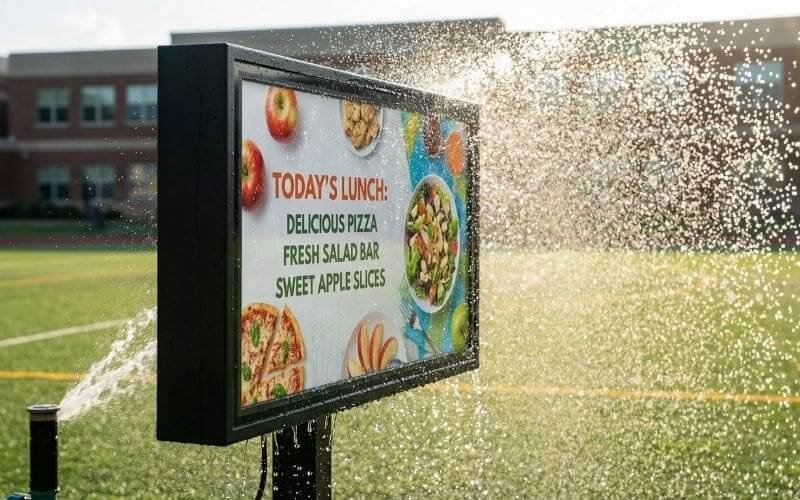
When commercial TV manufacturers test for “weatherproofing,” they often test for rain falling vertically or at a slight angle. But anyone who manages school grounds knows that the real enemy isn’t the clouds; it’s the Toro irrigation system.
School sprinklers are industrial beasts. They operate at high pressure. When a rotary head malfunctions or is misaligned, it shoots a concentrated jet of water horizontally—directly at your building’s facade, right where you want to mount your TV.
A standard “Outdoor TV” rated IP54 (Splash Proof) will fail here. The water pressure will force liquid past the seals, into the bezel, and short out the motherboard.
The Outvion Enclosure is rated IP65.
- The “6” (Dust Tight): No ingress of dust. This is critical for playgrounds where kickball dust and pollen are rampant.
- The “5” (Water Jets): Protected against water jets projected by a nozzle (6.3 mm) from any direction.
This means the enclosure can take a direct hit from a wayward sprinkler or a facility manager’s hose during summer cleaning, and the $800 TV inside stays bone dry. It transforms a delicate electronic device into a piece of hardened infrastructure.
Thermal Management and the “Black Screen”
The second enemy of outdoor digital signage is the sun. We call it the “Isotropic Blackout.”
Liquid Crystal Displays (LCDs) are fluids. When they get too hot, the liquid crystals lose their ability to twist and block light. If you place a standard TV in direct sunlight without active cooling, the internal temperature will rapidly climb past 140°F (60°C). When this happens, the screen develops a large, permanent black spot in the center. The TV is effectively cooked.
In a school pick-up lane, reflected heat from the asphalt and cars creates a micro-climate that is significantly hotter than the air temperature.
Outvion solves this with Active Thermodynamics.
- The Intake: Dual (or Quad) high-velocity fans pull ambient air from the shaded bottom of the enclosure.
- The Radiator Effect: This air is forced over the back of the TV chassis, stripping away heat, and exhausted out the top vents.
- The Result: It creates a continuous wash of airflow that prevents the “Greenhouse Effect” inside the case. Even on a sweltering August afternoon during “Back to School” night, the internal electronics stay within their safe operating range, ensuring your welcome message is actually visible.
The “Snow Day” Alert
Imagine it is January. A blizzard is rolling in. You make the call for an early closure. Instead of relying on a phone tree, you update a Google Slide from your desk. Instantly, the screens at the drop-off zone and the front gate flash bright red: “SCHOOL CLOSING AT 1:00 PM. BUSES RUNNING EARLY.” Parents see it from the warmth of their cars. The confusion is cut in half. That is the power of all-weather signage.
Campus Application Matrix
| Campus Location | Primary Threat | Risk Level | Outvion Solution |
|---|---|---|---|
| Pick-Up Lane | Rain / Sprinklers | High (Environmental) | IP65 Waterproofing |
| Gymnasium | Basketballs / Volleyballs | Extreme (Impact) | Shatterproof Polycarbonate |
| Cafeteria | Food Spills / Pranks | Medium (Hygiene) | Washable / Lockable |
| Quad / Playground | Theft / Vandalism | High (Security) | Dual-Key Locks + Bolt-Down |
| Hallways | Backpack Bumps | Low (Traffic) | Slim Profile / Rounded Corners |
The “Student-Proof” Standard: Why Glass is a Liability
The Principal’s Verdict: “I don’t care about the cost of the TV; I care about the cost of the lawsuit. If a student throws a rock and shatters a glass screen, we have sharp shards on the playground and an ambulance ride. Liability is our number one constraint. If it breaks, it cannot shatter.”
The Lawsuit Nightmare
Let’s play out the nightmare scenario. You install a standard “Weatherproof Outdoor TV” on the wall of the gym facing the playground. It has a tempered glass screen.
During recess, a 5th grader kicks a soccer ball. It goes wide. It slams into the TV screen crash . The tempered glass explodes. While “safety glass” is designed to crumble into cubes, it still creates debris. If a child falls onto it, or if jagged edges remain in the frame, you are looking at a medical incident report, a furious parent, and a potential negligence claim for putting glass in a play area.
This is why many districts ban glass signage entirely.
The Physics of Impact: Glass vs. Polycarbonate
Outvion does not use glass. We use High-Density Optical Polycarbonate (often known by the trade name Lexan).
To understand why this matters, we have to look at the physics of Young’s Modulus (Stiffness) versus Yield Strength.
- Glass: Glass is rigid. When a projectile (ball/rock) hits it, the glass resists the force rigidly until it exceeds its limit, at which point it suffers catastrophic brittle failure (shattering).
- Polycarbonate: Polycarbonate is ductile. It is the same material used in Police Riot Shields and Bulletproof Bank Windows. When a projectile hits the front panel of an Outvion enclosure, the material flexes. It absorbs the kinetic energy of the impact by temporarily deforming and then snapping back to shape.
It acts like a trampoline for the impact energy. A lacrosse ball thrown at full speed might scratch the surface, but it will not shatter it. The TV sitting 2 inches behind this shield remains completely untouched.
Material Science Showdown (School Safety Rating)
| Material | Typical Use | Impact Strength | Failure Mode | School Safety Rating |
|---|---|---|---|---|
| Standard Glass | Indoor TVs | Very Low | Sharp, jagged shards | F (Dangerous) |
| Tempered Glass | “Outdoor TVs” | Low/Medium | Crumbling cubes | D (Messy/Risky) |
| Acrylic (Plexiglass) | DIY Projects | Medium | Cracks into sharp spikes | C- (Brittle) |
| Polycarbonate | Outvion Enclosure | High (250x Glass) | Dents/Flexes (No Shards) | A+ (Student Proof) |
Indoor Versatility: Gyms & Cafeterias
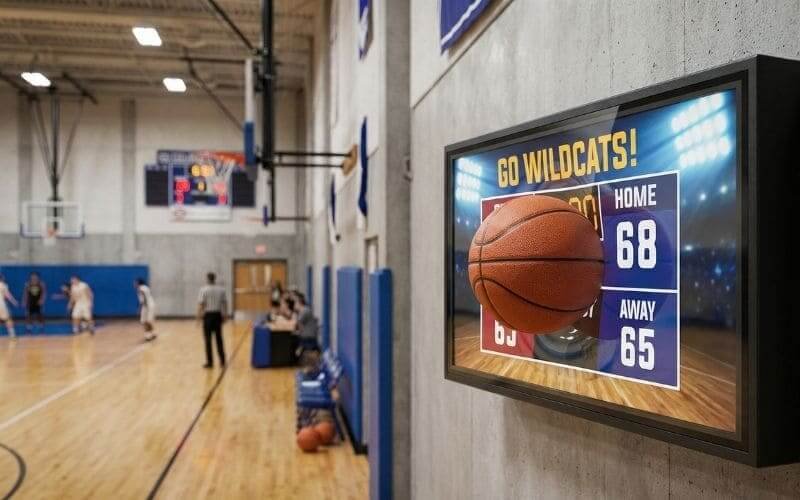
The Athletic Director’s Verdict: “The Gymnasium is a war zone for electronics. Between volleyball spikes and wayward basketballs, a naked TV lasts about a week. But we need digital scoreboards and replay screens. The enclosure gives us the confidence to put technology right on the court.
The Gym: The “Air Gap” Defense
Modern Physical Education involves video. Teachers want to show yoga routines, workout timers, or game tape. However, the gym is the most hostile environment in the school for a screen.
The Outvion enclosure protects the TV through the principle of the “Air Gap.” There is a physical separation (usually 1-2 inches) between the polycarbonate front shield and the actual LCD panel of the TV.
- The Impact: When a basketball slams into the front of the enclosure, the polycarbonate shield bows inward.
- The Defense: Because of the air gap, the bowing shield never touches the delicate LCD matrix behind it. The energy is transferred to the steel frame of the enclosure, not the TV. You could hit the enclosure with a baseball bat, and while the case might dent, the TV inside will keep playing the hype video.
The Cafeteria: The “Food Fight” Factor
The cafeteria is a different kind of battlefield. It’s not kinetic; it’s biological and chemical.
- The Threat: Ketchup splatters, spilled chocolate milk, accidental bumps from heavy backpacks, and the aerosolized sneeze of a sick kindergartner.
- Hygiene: In a post-COVID world, sanitation is critical. You cannot spray a standard TV with industrial disinfectant or hose it down. The liquid will seep into the bezel and ruin the screen.
- The Fix: With an Outvion enclosure, the TV is sealed behind a waterproof barrier. Your janitorial staff can wipe the screen vigorously with bleach wipes, spray it with sanitizer, or even hose it down (low pressure) during the summer deep clean. It allows you to maintain hospital-grade hygiene standards on your digital menu boards without destroying the electronics.
Security: Preventing Pranks & “Theft of Opportunity”
The IT Director’s Verdict: “Students are bored, smart, and mischievous. If there is a cable to unplug, they will unplug it. If there is an HDMI port exposed, they will plug in a console. If there is an Apple TV, it will walk away. We need a ‘Black Box’ that locks everything down.”
The Prankster Threat
It happens in every high school. A digital sign is put up in the hallway. Within a week, a student figures out they can reach behind it, unplug the HDMI cable from the media player, and plug in their own laptop to broadcast inappropriate memes or play video games for an audience.
This isn’t just a nuisance; it’s a breakdown of administrative control.
The Defense Strategy:
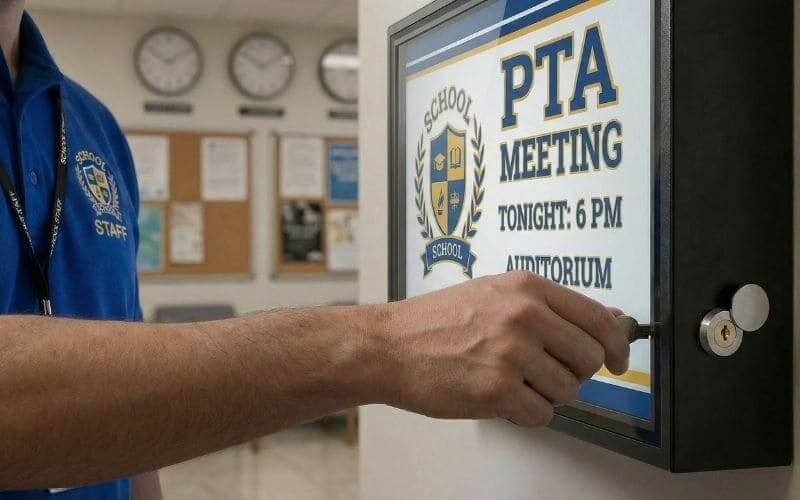
- Dual-Key Locks: Outvion enclosures feature two high-strength mechanical locks on the front frame. Without the physical key, the unit cannot be opened. This stops the “curious hands” from tampering with the TV.
- Port Denial (The “Black Box”): The TV is completely encased. The volume buttons, power button, and input ports are inaccessible. A student cannot walk up and turn the volume to 100 or switch the input.
- Bolt-Down Security: Theft of the actual TV is rare because they are heavy. Theft of the peripherals (Apple TV, ChromeBit, Roku) is common. These small devices are “Theft of Opportunity” targets. Inside the Outvion enclosure, there is ample room to mount these devices securely behind the locked steel frame. The entire unit becomes a vault for your media player.
Budget Logic: The “Google Slides” Hack
The School Board Verdict: “We are accountable to the taxpayers. We cannot justify spending $15,000 on a single sign when the roof needs patching. But we can justify $1,500 for a communication tool that uses existing software licenses. The ROI has to be immediate.”
The “Proprietary Software” Trap
The biggest hidden cost in commercial digital signage isn’t the hardware; it’s the software. Vendors will sell you a kiosk and then hook you with a $1,500/year subscription for their proprietary “Content Management System” (CMS). If you stop paying, the sign goes dark.
The Solution: Commodity Hardware + Free Software
Here is the recipe for a district-wide digital signage network that costs 90% less than the commercial alternative.
The Step-by-Step “Google Hack”:
- The Hardware: Buy a consumer-grade 65-inch 4K Smart TV from Best Buy($500)
.Buy an Outvion Enclosure ($780). Buy a Google Chromecast ($30). - The Content: Open Google Slides (which your district likely already uses for free). Design your announcement slides (Lunch Menu, Bus Schedule, Student of the Week).
- The Deployment: Set the Google Slide deck to “Publish to Web” and set it to loop every 5 seconds.
- The Display: Plug the Chromecast into the TV inside the secure enclosure. Use the Google Home app to cast that slide deck to the TV.
- The Update: Whenever the secretary needs to change the message, she just edits the Google Slide on her computer. It automatically updates on the screen outside.
Zero subscription fees. Zero new software to learn. Total ownership of the hardware.
Cost Comparison (Outdoor LED Kiosk vs. Outvion System)
| Cost Component | Dedicated Outdoor LED Kiosk | Outvion Enclosure + TV |
|---|---|---|
| Hardware Cost | 12,000−20,000 |
1,300−1,800 |
| Software Cost | $1,000 / Year (Proprietary) | $0 (Google Slides / Canva) |
| Installation | High (Concrete pad, trenching) | Low (Wall mount) |
| Repair Cost | High (Specialized technician) | Low (Swap the $500 TV) |
| Total 5-Year Cost | $20,000+ | <$2,000 |
| Funding Source | Capital Bond Measure | PTA / Principal’s Discretionary |
Infrastructure & Installation: Getting It on the Wall
The Cinder Block Challenge
Schools are built like bunkers. They are constructed of Cinder Block (CMU) and Brick. This makes them safe, but it makes mounting TVs difficult. Standard drywall anchors will not work; they will pull right out, and the TV will fall.
The Fix:
- Sleeve Anchors: When mounting the Outvion enclosure to a block wall, use 3/8″ Sleeve Anchors. You drill a hole into the block, insert the anchor, and tighten the nut. The sleeve expands, gripping the masonry with thousands of pounds of force.
- Tapcon Screws: For brick, use Tapcon concrete screws. These cut threads directly into the masonry.
The Chain-Link Fence Solution
Principals often want screens on the baseball field backstop or the tennis court fence. You cannot bolt an enclosure to a chain-link mesh.
- The Hack: Use “Unistrut” (Metal Strut Channel) or a sheet of 3/4″ Marine Plywood painted black. Bolt the Plywood/Unistrut to the fence posts to create a solid backing plate. Then, bolt the Outvion enclosure to that plate. This distributes the weight and ensures the screen is stable even on a windy day.
Power Requirements
The enclosure does not generate power; it protects it. You must work with your facility electrician to install a GFCI (Ground Fault Circuit Interrupter) outlet at the installation point. This is code-required for outdoor wet locations. The TV and the enclosure fans plug into this protected outlet.
Conclusion: Modernize Your Campus Safely
You don’t need a military budget to communicate effectively; you just need military-grade protection for your budget-friendly technology.
Don’t let the fear of breakage stop you from modernizing your school. Whether it’s showing the football highlights in the gym, the lunch menu in the cafeteria, or the emergency alerts in the pick-up lane, the Outvion system provides the armor you need to survive the K-12 environment.
FAQ for School Admins
1. Is the front panel clear enough for text announcements?
Yes. We use high-clarity optical Polycarbonate. It is designed to be transparent. However, for the best readability outdoors, we recommend a content strategy of High Contrast. Use white text on a black background. This cuts through glare and makes the text “pop” for parents reading from their cars.
2. Can we install this on a chain-link fence at the baseball field?
Yes, but with modification. You cannot mount directly to the mesh. You need to create a backing plate (using marine plywood or Unistrut metal channels) that spans the fence posts. You bolt the enclosure to this solid plate. The enclosure will protect the TV from foul balls and weather.
3. Does it support Apple TV / Chromecast for announcements?
Yes. The enclosure is designed with extra depth (Z-depth). There is plenty of room inside the case, usually below or behind the TV screen, to velcro a small media player like an Apple TV, Roku, or Chromebit. This keeps the device secure and powered by the TV’s USB port or the internal power strip.
4. What if a student spray paints the screen?
This is a classic vandalism fear.
- The Reality: Polycarbonate is chemically resistant to many solvents.
- The Fix: If a student tags the front panel, you can typically remove the graffiti using a specialized cleaner (like “Graffiti Safewipes”) or isopropyl alcohol without melting the plastic. If the damage is severe, you replace just the front window (
100),nottheentire1,500 unit.
5. Is it safe for a Kindergarten playground?
Yes. Safety is built into the design. The enclosure features rounded corners (no sharp metal edges to fall against). The lockable front means no little fingers can touch electrical outlets. And most importantly, the lack of glass means zero risk of shatter injuries.
6. How do we power it outdoors?
The enclosure does not generate power; it protects the power source. You will need your facility electrician to run a hardwired GFCI outlet to the installation location (e.g., the brick wall of the gym). The TV and fans plug into this outlet inside the weatherproof enclosure.
Recommended Technical Reading
- School Safety Infrastructure:CoSN (Consortium for School Networking)
- Resources on modernizing campus technology securely.
- CPTED Principles:National Crime Prevention Council
- Crime Prevention Through Environmental Design – applying ruggedized assets to reduce vandalism.
- Digital Signage in Education:Digital Signage Federation
- Case studies on how digital signage improves campus communication and safety.